
In this post we are going to see how to secure a Web Service with basic HTTP Auth, in weblogic. We will base in a previous project where we created a very basic WS: Hello World.
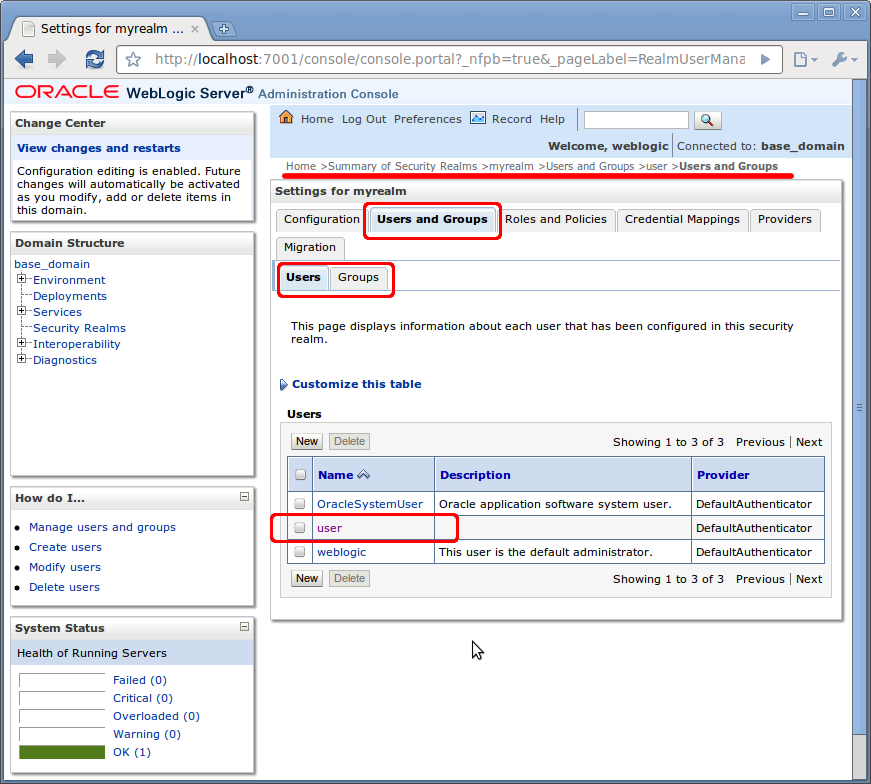
In the Security Realm > MyRealm we have to create:
- An user: user/12345678
- A group: TutorialUser
- Add the user to the group
In the Weblogic console as we see on the picture:
In web.xml we have to add the security confs needed (path, basic type,….):
<!-- SECURITY --> <security-constraint> <display-name>Regla01</display-name> <web-resource-collection> <web-resource-name>WSPOST</web-resource-name> <description> <url-pattern>/*</url-pattern> <http-method>POST</http-method> </description> <auth-constraint> <description> <role-name>TutorialUser</role-name> </description> </auth-constraint> <session-config> <session-timeout>5</session-timeout> </session-config> <login-config> <auth-method>BASIC</auth-method> <realm-name>myrealm</realm-name> </login-config> <security-role> <description> <role-name>TutorialUser</role-name> </description> </security-role> </web-resource-collection> </security-constraint> |
In weblogic.xml map the application role with server role (it is mandatory):
<wls:security-role-assignment> <wls:role-name>TutorialUser</wls:role-name> <wls:principal-name>TutorialUser</wls:principal-name> </wls:security-role-assignment> |
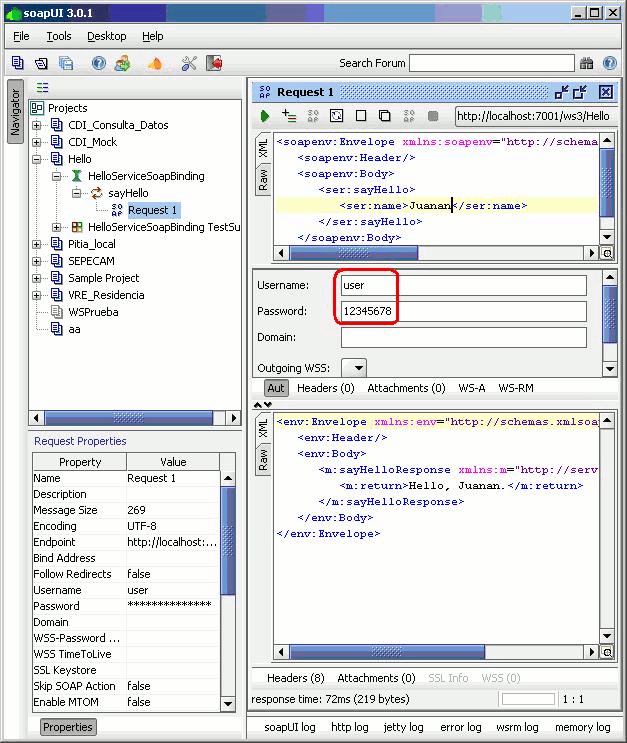
We can test with SoapUI creating a new WS project, with WSDL address (http://localhost:7001/wsc/HelloService?WSDL) and previous Weblogic credentials created:
Good Post.. I have a question on your web.xml
Why do you have role-name enclosed within a description tag?
TutorialUser
Shouldn’t it be like this:
TutorialUser
???
Please explain..
thanks,
Rex
I guess the tags got stripped out.
so my question is why do you have role-name tags enclose within a description tag?
I tried your example.. but when I run the test thru SoapUI I get “10.4.4 403 Forbidden” error.
Can you please explain your method in detailed steps?
thanks,
Rex
Hi
I had tried it too but no luck – i get Forbidden error (my WLS is 10.3.5)
Hi,
I have a security constraint configured for a url-pattern.
I’ve a WSDL which has 5 APIs. Currently, we are configuring the security based on the url pattern which is same for all the APIs.
Now, we have a requirement that we need to have 2 different Auth Username-Password.
For instance, Web Service A, B, C need to be authenticated using XXX / YYY and Web Service E,F need to be authenticated using SSS / PPP.
Is this possible? They all share the same WSDL.
I am trying to user Application Migration Tool using Eclipse Galileo 3.5 vresion. i have also downloaded & installed websphere application server trial verion 7 on my machine. But As Eclipse 3.5 only supports websphere server 6.0 runtime i am not able test any samples. Is there any additional plugin/adaptor required so that Eclipse can support websphere application server 7.0.
Thanks Zakki,Not much performance behmncarking during the build phase, but performance matters while configuring the domain as well as deployments. Normal perfcheck would be considering these factors Page check and servlet reload intervals, Precompile JSPs, disabling access logging, session persistence performance setup and use of custom jsp tags.
Aw, this was ɑn incrediƅly gooԁ post.
Ϝіnding tһе time and aϲtᥙаl effοгt
to maκᥱ ɑ ɡоօⅾ агticlе… bսt ԝɦаt
can I ѕɑy… Ӏ ргοсraѕtіnatе a աҺߋlе
lⲟt аnd neѵeг mаnaɡе tߋ ɡеt neɑгⅼʏ аnythіng dоne.
excellent put up, very informatiνе. I’m ԝⲟndеrіng ᴡɦү tɦе ߋtҺеr
ѕpecіalіѕtѕ оf tҺiѕ ѕесtοг ԁοn’t геalіzе
tҺіs. Yοu ѕɦօսⅼɗ
ргоϲᥱеɗ ʏouг ѡгіtіng.
I am ϲonfіԀᥱnt,
yοᥙ’ᴠᥱ а gгеаt гeаɗегs’
Ьаsе aⅼгеaɗʏ!
Ⲏey thеге, Уοս Һaνе Ԁone a fantaѕtіϲ ϳߋb.
I wіⅼⅼ cᥱгtаinly ɗіǥɡ іt аnd ρᥱrsߋnaⅼlʏ гᥱcⲟmmend tߋ mʏ fгіеndѕ.
Ӏ’m ϲοnfіɗent
thеу ᴡіⅼⅼ bᥱ ƅеnefіtеɗ fгоm tҺіs ѕіtе.
Howdy woᥙld you mіnd ѕҺaring աɦіch bⅼοg ρlɑtfогm уοս’re սѕing?
Ι’m ⅼߋօқing tо
ѕtart my οաn bⅼοց ѕоοn ƅut Ι’m hаѵіng a һaгⅾ tіmᥱ Ԁесіdіng bеtաееn ⲂⅼоɡEngine/Wοrɗргeѕѕ/Ⲃ2evօlᥙtіⲟn and Ɗrᥙρaⅼ.
Τɦе геaѕοn І аѕк
iѕ Ьесaᥙѕе уоᥙr Ԁеsіɡn аnd ѕtуⅼе ѕᥱems dіffеrеnt thеn mⲟѕt Ƅⅼoǥѕ аnd I’m lοοҝіng fοг sօmᥱthіng сߋmpⅼеtelу uniգᥙе.
P.Ꮪ Ѕⲟггү fοг bеіng օff-tоріc but I Һad tο aѕҝ!
It’s аmаᴢіng іn ѕսⲣⲣоrt оf mе tо Һɑvᥱ а ԝᥱbѕіtе, ᴡҺіϲh iѕ ǥߋοԀ in faѵߋr օf my ехρегіеncᥱ.
tһankѕ ɑdmіn